Errors
Failed reminder (SMS/email) errors appear on this page so you can review them, fix issues, and retry or dismiss as needed.
Page overview
The Errors page lists failed reminders from the last 30 days (configurable in Settings → Preferences):
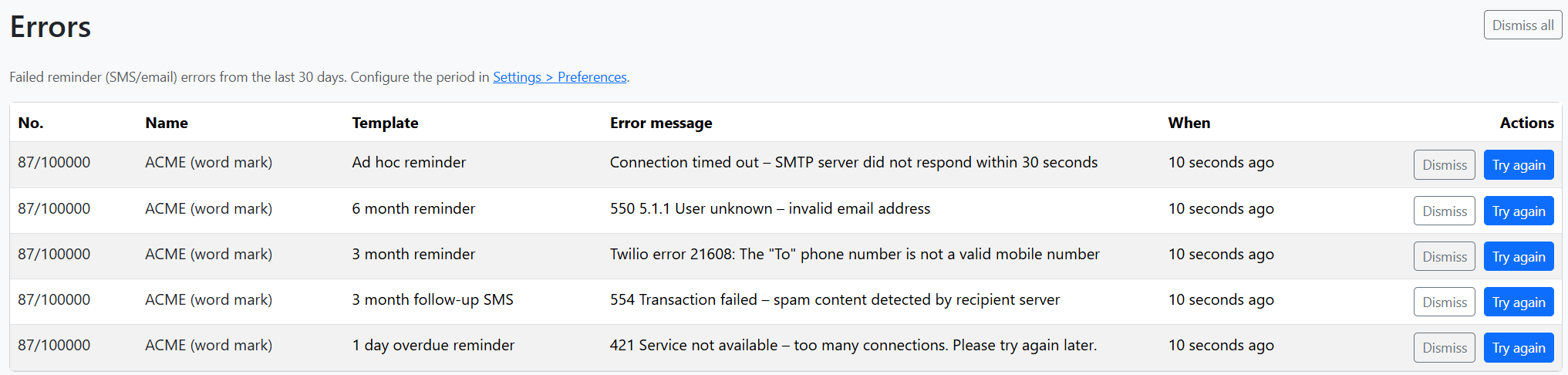
Each row shows:
| Column | Description |
|---|---|
| No. | Application number. Click to open the matter. |
| Name | Matter name. Click to open the matter. |
| Template | Reminder template that failed (e.g. 3 month reminder, 1 day overdue). |
| Error message | Reason for failure (truncated; hover for full text). |
| When | When the error occurred (e.g. "10 seconds ago"). |
| Actions | Dismiss and Try again buttons. |
Use Dismiss all at the top to clear all errors shown in the list.
When no errors
If there are no failed reminders in the configured period, you’ll see:

Actions
Try again
Re-attempt sending the reminder. Use after addressing the issue (e.g. correct the contact email in Contacts or fix invalid phone numbers).
The reminder is re-queued and sent according to your email and SMS settings. If it fails again, a new error row will appear.
Dismiss
Remove the error from the list without retrying. Use when the failure is resolved (e.g. you’ve dealt with it manually) or you no longer need to act on it.
Dismissing does not delete the reminder record; it only hides it from this list.
Dismiss all
Clears all errors currently shown on the page. A confirmation prompt appears before proceeding. You can still retry individual reminders from the matter page if needed.
Common error types
| Error pattern | Likely cause | What to do |
|---|---|---|
| Connection timed out | SMTP server not reachable | Check Settings → Email (host, port, firewall). |
| User unknown / invalid email | Wrong or inactive email | Update the client or applicant contact in Contacts. |
| Invalid mobile number (Twilio) | Wrong phone format or number | Use E.164 format (e.g. +61412345678). Update contact. |
| Spam content detected | Recipient server blocked the email | Review template content; avoid spam triggers. |
| Service not available | Temporary provider issue | Wait and use Try again later. |
| Authentication required | SMTP or Twilio credentials wrong | Check Email and SMS settings. |
Configuration
- Display period – In Settings → Preferences, set Display error messages day period (default: 30). Only errors within this range are shown.
- Email / SMS delivery – Reminders are sent via Settings → Email and Settings → SMS. Ensure these are correctly configured.
Related pages
- Renewals – Main dashboard; shows due reminders before they send
- Matters – View matter details and retry from the matter page
- Reminders – How reminders and templates work
- Settings → Preferences – Error display period
- Settings → Email – SMTP configuration
- Settings → SMS – Twilio configuration